This means that for a big reduction on our normal pricing, you can use our archiving toolset with native Notes archiving.
Why would you want to do that? To make more efficient use of IT resources, find out what's happening in your environment, and - more importantly - save your users time.
What you get from Native Notes Archiving;
- Fast, large-scale moving of data.
- Easy management via Archiving Policies.
- Support by IBM.
But what you DON'T get is decent tools to use that archived data, or even tools to tell you what's actually being archived. This means users spend a lot of time trying to find and use their archived data, and that can be improved.
What you can add with the IONET Native Archiving Toolkit;
(click images for a larger version)
 | Simultaneous Searching across ALL Mail & Archive Databases via Notes, iNotes (including Mobile) or Browser. This makes it easy for users to find and use their data, regardless of its location. |
 | Discovery Search across all Mail & Archives, for Admins, Power Users, Legal Departments etc. |
 | The ability to natively archive Mail-In Databases. |
 | User Functionality like 'Archive Selected Documents', 'Restore Documents', and 'Open Archives'. |
 | Reporting and Charting of Archiving performance, e.g. Volume of data archived, Number of Docs archived, Production vs Archive Size Ratios etc. |
 | Tools to migrate local User Archives. |
 | Administration Tools such as ACL Synchronisation, limiting access to Archives, Archive Database naming, Archive Database moving etc. |
What you miss out on by not using our full Archiving Solution;
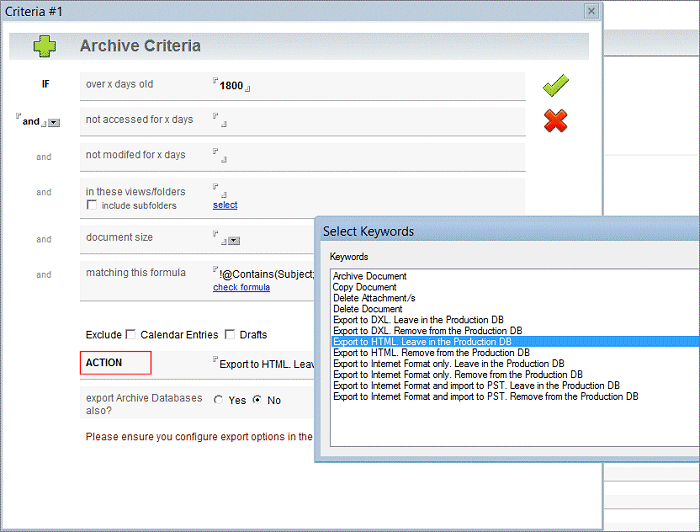
- Up to 10 Archiving Criteria, including folders, dates, document size, and @formulas.
- Intelligent Quotas, e.g. gradually reducing databases sizes to the defined limit.
- The ability to export data to different formats, e.g. HTML, XML and PST.
- The use of Archive Stubs, to refer Notes and iNotes Clients to the archived document.
- Two-stage archiving, e.g. archiving from archives.
- Archive Housekeeping, such as automatic archive creation, rotation and expiry.
- Archive Timing functions, so you don't over-run your archiving window.
- The ability to archive duplicated mail documents.
- The ability to compress attachments during archiving.
- The ability to archive different documents to different databases, e.g. all documents in 'ACME' folders into the 'ACME Project' archive.
- The ability to archive custom applications.
- Flexibility options, e.g. protect certain documents, synchronise documents (such as lookup documents), set fields on documents during archiving, run custom agents before/after archiving and restoring, or before/after creating archives etc.
Key Features;
- Allows Users to easily find and use natively archived data, via Notes or iNotes, saving them time.
- Allows Administrators to manage the archiving environment, performing common tasks and migrating local archives.
- Gives Management visibility to archiving effectiveness via Reporting.
- Allows native archiving of Mail-In Databases.
- Adds Discovery Search functionality to your Mail & Archive environment.
- Builds on Native Archiving functionality.
- Blends seamlessly into your Notes/Domino environment.
To find out more, please visit our Native Archiving Toolkit Page.