Showing posts with label lotus notes archiving. Show all posts

Thursday, 1 October 2015

IONET Archiver v4 - Improving your Native Notes Archiving

IONET Software are pleased to announce v4 of our Archiver for Notes product, which now includes support for native Notes archiving, even when it's already in use.

This means that for a big reduction on our normal pricing, you can use our archiving toolset with native Notes archiving.

Why would you want to do that? To make more efficient use of IT resources, find out what's happening in your environment, and - more importantly - save your users time.


What you get from Native Notes Archiving;
  • Fast, large-scale moving of data.
  • Easy management via Archiving Policies.
  • Support by IBM.

But what you DON'T get is decent tools to use that archived data, or even tools to tell you what's actually being archived. This means users spend a lot of time trying to find and use their archived data, and that can be improved.


What you can add with the IONET Native Archiving Toolkit;
(click images for a larger version)

   Simultaneous Searching across ALL Mail & Archive Databases via Notes, iNotes (including Mobile) or Browser. This makes it easy for users to find and use their data, regardless of its location.
    Discovery Search across all Mail & Archives, for Admins, Power Users, Legal Departments etc.
   The ability to natively archive Mail-In Databases.
   User Functionality like 'Archive Selected Documents', 'Restore Documents', and 'Open Archives'.
   Reporting and Charting of Archiving performance, e.g. Volume of data archived, Number of Docs archived, Production vs Archive Size Ratios etc.
   Tools to migrate local User Archives.
   Administration Tools such as ACL Synchronisation, limiting access to Archives, Archive Database naming, Archive Database moving etc.


What you miss out on by not using our full Archiving Solution;
  • Up to 10 Archiving Criteria, including folders, dates, document size, and @formulas.
  • Intelligent Quotas, e.g. gradually reducing databases sizes to the defined limit.
  • The ability to export data to different formats, e.g. HTML, XML and PST.
  • The use of Archive Stubs, to refer Notes and iNotes Clients to the archived document.
  • Two-stage archiving, e.g. archiving from archives.
  • Archive Housekeeping, such as automatic archive creation, rotation and expiry.
  • Archive Timing functions, so you don't over-run your archiving window.
  • The ability to archive duplicated mail documents.
  • The ability to compress attachments during archiving.
  • The ability to archive different documents to different databases, e.g. all documents in 'ACME' folders into the 'ACME Project' archive.
  • The ability to archive custom applications.
  • Flexibility options, e.g. protect certain documents, synchronise documents (such as lookup documents), set fields on documents during archiving, run custom agents before/after archiving and restoring, or before/after creating archives etc.

Key Features;
  • Allows Users to easily find and use natively archived data, via Notes or iNotes, saving them time.
  • Allows Administrators to manage the archiving environment, performing common tasks and migrating local archives.
  • Gives Management visibility to archiving effectiveness via Reporting.
  • Allows native archiving of Mail-In Databases.
  • Adds Discovery Search functionality to your Mail & Archive environment.
  • Builds on Native Archiving functionality.
  • Blends seamlessly into your Notes/Domino environment.


To find out more, please visit our Native Archiving Toolkit Page.

Monday, 8 June 2015

Archiving from Notes to HTML

Since March, it's been possible to use our Notes Archiving tool to archive Notes Mail to Internet Formats and PST, as well as perform normal Notes (to NSF) archiving.

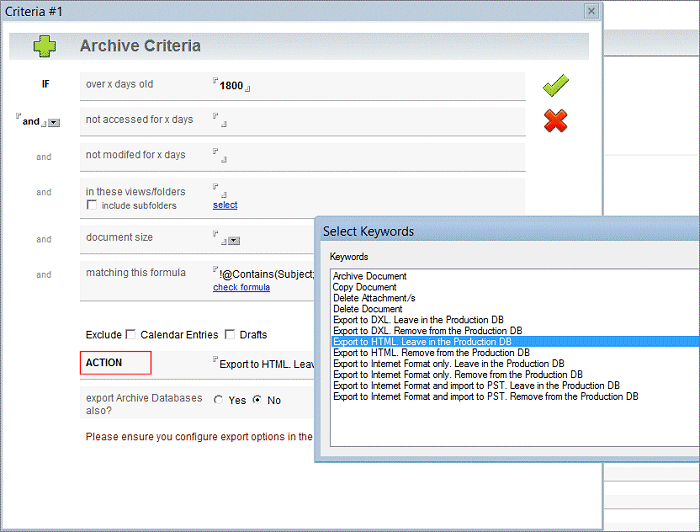
We've now added the ability to archive Notes Mail and Applications to HTML and DXL/XML as well.

This allows Administrators to easily target specific Notes data, then process it based on their requirements, e.g. archiving to Notes itself, storing it in a non-proprietary format like HTML or XML, or migrating it for use with another application.


For example, to migrate to Outlook;

1. Your first archive criteria might first remove all mail with the phrase '[SPAM]' in the Subject.
2. Your second criteria might then archive all historical mail over 5 years old, and without the phrase '[HR]' in the Subject, to read-only HTML.
3. Your third criteria might then archive all mail 1-4 years old to PSTs named "Username" Notes Mail 2011 - 2014.
4. Your fourth criteria might archive all mail less than 1 year old to PSTs named "Username" Notes Mail 2015.

OR;

1. Archive all mail over 1 month old to PSTs named "Username" Notes Mail, leaving the original mail intact. This can be done over time without users even being aware of it, in order to migrate the majority of user data (as mail doesn't tend to change too much after the first month).
2. At a designated cutover date, archive any changes plus the remaining data, resulting in all Notes Mail being available in PSTs.

OR you could;

1. Select custom Notes applications and archive all data over 6 years old to HTML.
2. Archive all remaining data to DXL/XML, transform it via XSLT, and use it in another application.


There are multiple customisation options, and you can modify our stylesheets to suit your own processing requirements.


1. Select Archive Criteria (or you can just archive the entire database).


2. Exported Mail Results in HTML.

3. Exported Application Results in HTML.


4. Exported Mail Results in PST.


For more information or a free, no-obligation trial version, please see the IONET Archiver for Notes.

Thursday, 19 March 2015

Archiving directly from Notes to Microsoft Outlook

IBM (Lotus) Notes is an excellent product, but it's inevitable that some users will eventually migrate to other platforms.

As well as archiving to NSF, the IONET Archiver for Notes now also archives directly to PST and common internet formats, allowing you to easily manage your migration to a new platform.

Archiving runs on the Domino Server and exports Notes Mail, Archives, Calendars, Tasks, Contacts and Journals to internet standard formats (*.eml, *.ics, *.vcf etc), then optionally imports to PST, ready for Microsoft Outlook. Full fidelity is provided for attachments, graphics & doclinks, along with comprehensive archiving options.

For example, to tidy up the environment, you could first archive all mail over 2 years old to NSF. You could then archive all other mail over 1 month old to PST, without removing it from Notes Mail. This processes the majority of data without affecting users. Finally, on the day of the cutover, archive all remaining mail to PST. Users then just open their fully populated PSTs in Outlook the following day, without any mail interruption. Alternatively, use more advanced constructors like @Formulas to be extremely specific about what data to remove, what data to archive to NSF, and what data to migrate to PST.

To allow users to migrate their own local mail and archives, please see the IONET NSF Exporter tool instead.

Default Settings


Archive Criteria


Key Features
  • Automatic Setup & Operation, including product updates.
  • Profile driven for easy management of multiple users and databases.
  • Archives to NSF, Internet Formats (*.eml, *.ics, *.vcf etc), and PST.
  • Scalable to any Organisation size.
  • Can be used as a Migration tool, one-off or ongoing.
  • Fully supports iNotes users, including Mobile iNotes.
  • Archives any Notes database, including Mail, Applications and Quickr.
  • Multiple Archive Criteria per database, using any combination of document size, age, last modified date, last accessed date, View/Folder, or @formula.
  • Optionally replaces archived documents with stubs, iNotes compatible.
  • Simultaneously searches across production and archived data, via Notes Client, iNotes and Tablet/Smartphone.
  • Discovery Search across all Production & Archive databases.
  • Comprehensive Graphical Reporting.
  • Multiple customisation options.
  • Multiple character set support.
  • Multiple language support.
  • Fully supports offline/remote users.
  • DAOS compatible.


For more information, downloads and demos, please visit the IONET Archiver for Notes page.