We think we have the best Notes Search Tools currently available, and this video shows why.
But it's not just us who think this - many users have said so also;
- "FT Search Manager is really the 'killer app' we have been searching for."
- "Great tool - saves heaps of time and is so quick in searching and finding results."
- "This is a great product at a great price and something everyone in the Notes/Domino community should be using."
- "Love it :)"
More testimonials available here.
There's no point in having our search product just sitting on the shelf (albeit a virtual shelf), so we're offering a massive discount of 50% off the list price, providing your interest is registered during July 2012.*
All you need to do is register for a download, or contact us during July of this year. If you eventually decide to purchase (even if it's not in July), you realise the discount. If you don't decide to go any further, no problem.
So please feel free to try out the demo - we think you'll be surprised at how much more effective it makes your Notes environment.
For more information on IONET products & services, or to contact us, please visit http://www.ionetsoftware.com.
* Full discount might not apply to reseller-brokered sales.

Monday, 2 July 2012

Thursday, 24 May 2012
iNotes getNonce change
If you're using the iNotes Extension database (usually forms85_x.nsf) to extend iNotes, and using a 'nonce' (not to be confused with the slang term), you might be interested to know that between 8.5.2 & 8.5.3 the syntax changed.
If you couldn't understand why the call fails with 8.5.3, and you found this post via web search, hopefully it will help.
Change this
AAA.getNonce();
to this
AAA.HHT ? AAA.HHT() : AAA.getNonce();
and it should be fine.
Tuesday, 1 May 2012
Speeding up Notes applications
Our FT Search Manager product (http://www.ionetsoftware.com/search) has been around for a while now, and being a search tool, we're always trying to increase it's search speed. The latest version (4.6 - sound familiar?) is a lot faster than previous versions - FYI here's a short YouTube demo showing the faster speed achieved http://www.youtube.com/watch?v=FFcxSQ8PaIM.
If anyone's interested, here are the main methods we used to speed it up;
1. Each multi-threaded search agent only populates up to the first page of results (e.g. 10 results if that's how many results are displaying per page) then writes it's full result set to a storage document. It only populates the first X results because that's the slow part - getting data from each document. The last agent to finish assembles all the results, re-sorts them, then presents them. The first couple of pages are already available, and the remaining stubs are then populated in the background, which means the first page displays in the shortest possible time.
2. Concatenating evaluate statements. We use fields & @formulas to return document data. If there are 4 fields & @formulas required, it's much faster to execute one evaluate statement, e.g. Evaluate(@formula1 : @formula2 : @formula3 : @formula4, NotesDocument), rather than repeating it 4 times.
3. Using NotesDocument.Save only when necessary.
4. Using NotesRichTextItem.GetUnformattedText instead of GetFormattedText.
5. Using Lists to store commonly used databases, views & variables.
6. Using the LS 'Split' function as much as possible.
7. Moving everything unnecessary out of loops.
8. Performing only one @DBLookup to get all required data in one operation, then splitting the results into separate fields.
9. Storing data in Profile documents and only retrieving new data if the relevant option changes.
Hopefully someone finds these points useful.
Wednesday, 11 April 2012
Getting the most from your Notes environment
One of the problems with the continual upgrade cycle of computing (--> Connections, Quickr, XPages etc) is that it doesn't make efficient use of your existing environment - it's like buying a new TV when you could improve your viewing by re-tuning the old one.
Notes has been around for 20+ years, and it's distributed nature means users have their data scattered around many locations - Mail, Archives, Discussions, Document Repositories, File Systems, Apps, Quickr etc.
Over time, finding that information becomes more and more difficult - because users need to know roughly where it is. If they forget that, it can take a long time to find, or just not be found at all. It's surprising how much time (and therefore money) is spent looking for information.
The native Notes search facilities (Domain Search or Search Site - don't mention Extended Search) can search a lot of data and present a lot of results, but they don't present it very well or offer many options for using & refining it. They're fast, but navigating through hundreds of results that all look very similar is really just not useful enough, which is why few companies implement them.

It's much more efficient for users to be able to search only the data sources relevant to them, get easily understood and useful results, then refine their search or re-sort the results as necessary. This is slower than the native search methods, but it's much more accurate. This in turn is more useful, less frustrating, saves wasting time, and therefore saves money.

Giving your users tools to use the data they already have - as well as adding new tools such as Connections & XPages - is the best way to get the most from your Notes environment.
For more information, please see our FT Search Manager
http://www.ionetsoftware.com/search
Notes has been around for 20+ years, and it's distributed nature means users have their data scattered around many locations - Mail, Archives, Discussions, Document Repositories, File Systems, Apps, Quickr etc.
Over time, finding that information becomes more and more difficult - because users need to know roughly where it is. If they forget that, it can take a long time to find, or just not be found at all. It's surprising how much time (and therefore money) is spent looking for information.
The native Notes search facilities (Domain Search or Search Site - don't mention Extended Search) can search a lot of data and present a lot of results, but they don't present it very well or offer many options for using & refining it. They're fast, but navigating through hundreds of results that all look very similar is really just not useful enough, which is why few companies implement them.

It's much more efficient for users to be able to search only the data sources relevant to them, get easily understood and useful results, then refine their search or re-sort the results as necessary. This is slower than the native search methods, but it's much more accurate. This in turn is more useful, less frustrating, saves wasting time, and therefore saves money.

Giving your users tools to use the data they already have - as well as adding new tools such as Connections & XPages - is the best way to get the most from your Notes environment.
For more information, please see our FT Search Manager
http://www.ionetsoftware.com/search
Monday, 13 February 2012
Search speed improvements
We're pleased to announce that the latest version of the FT Search Manager (v4.3) is at least 25% faster than older versions - and often more, depending on the content being searched.
This was achieved by rewriting the Notes search engine, so that each search thread first identifies the top x documents matching it's criteria & sort options, e.g. 'Person contains *acme*' & 'newest first', and then populates only enough results to make up the first result page.
The last thread to finish this process becomes the 'Sort' thread, sorting the result data from multiple searches/databases, then writing to the Results page. Because there is multiple page content already assembled, this is a very fast process.
After the first page of results displays, the Sort thread continues adding further result data in the background, using stubs set up by the initial search threads.
The initial results are therefore presented much faster, and that makes a difference when you have a large mail file to manage.
Thursday, 26 January 2012
A better Notes Mail search
Since the start of 2012, we've spent a lot of time adding functions to our FT Search Manager product, specifically for Mail & Archive searching. The results are much, much easier to use, and it's by far the easiest way to find mail you're looking for, no matter it's location.
For example, you can start searching from a Toolbar icon (e.g. anywhere in the Notes Client);

or perhaps an Action in your mail file;

then search using whatever fields & options the Administrator has enabled;

(note the interface is translatable, e.g. 'Zoeken').
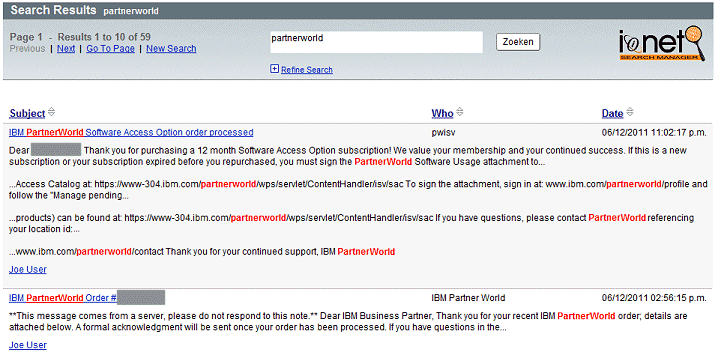
You then get an easily understood precis of the result set (in Notes), sorted as required, allowing you to quickly find your target document.

If you still can't find what you're looking for, you can change the criteria and re-search, start a new search, or just re-sort the existing results (here the 'Date' column has been re-sorted ascending).

You'll be surprised by how much time you save looking for documents, compared to a 'normal' search. And being a Notes Database, it also works locally.
If you're interested in other types of search, you can also search File Systems, iNotes, Quickr, and any custom Notes apps, via Notes Clients, Browsers, iPads, iPhones, Web Services, Portals and Discovery/Compliance Searching.
For free trial versions & more information, please visit http://www.ionetsoftware.com/lotus-notes-products/lotus-notes-search
Thursday, 17 November 2011
Install, create and execute workflow in under 5 minutes
The following video shows the installation, construction & execution of a Notes workflow in under 5 minutes, using the IONET Workflow Manager, Notes Client and XPages.
You can see more information, or download a demo, here http://www.ionetsoftware.com/workflow.
Subscribe to:
Posts (Atom)